
Big hair. Soft focus. Direct flash. The 80s AI photo trend turns a portrait from today into the kind of picture you might find in a 1985 yearbook or a long-forgotten family album. With Deep Art Studio, you can build the look in plain language – without choosing the technology behind it.
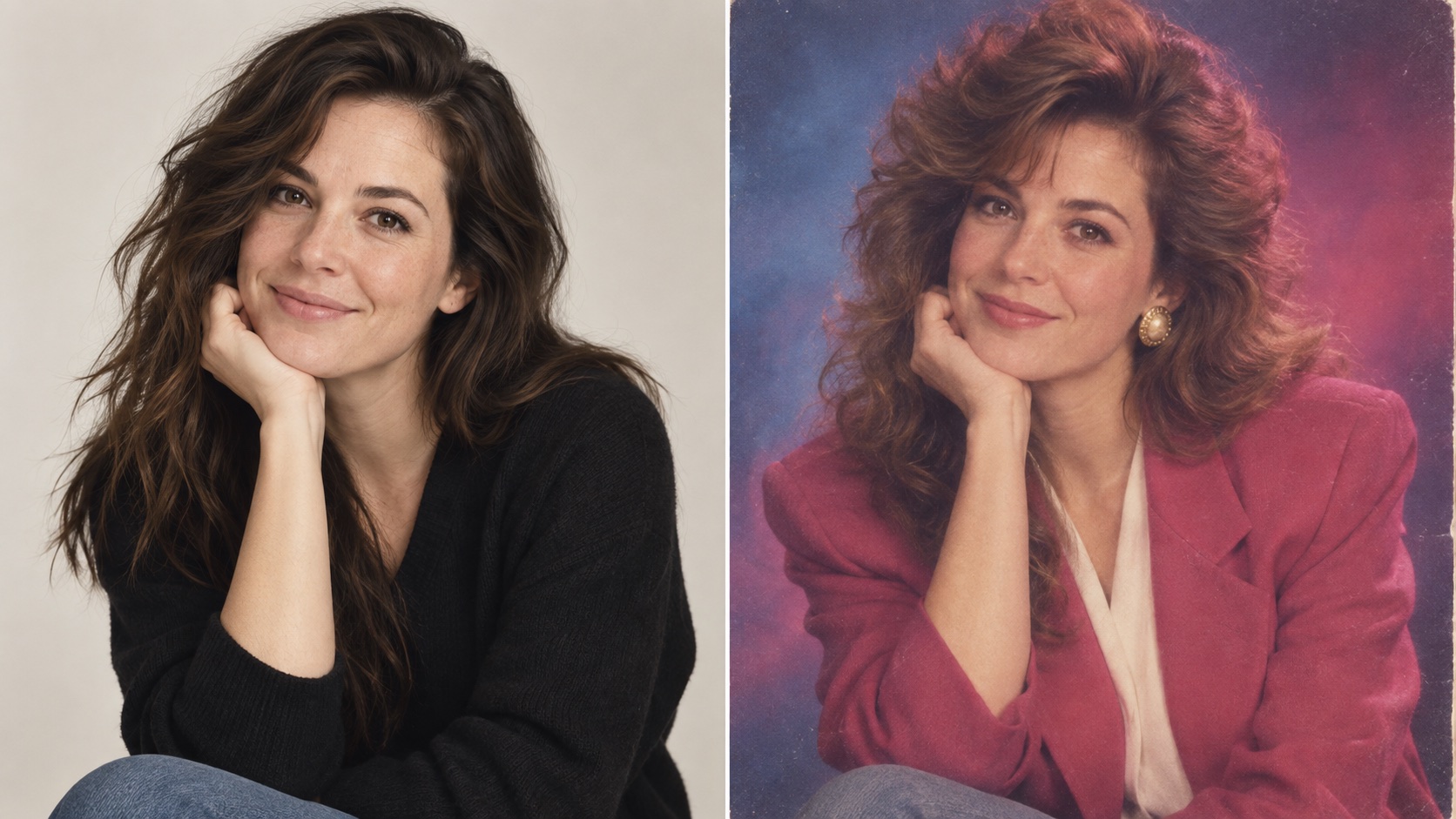
If your feed suddenly looks like 1986, you are not imagining it. In September 2026, social platforms filled with AI-made throwback portraits: familiar faces recast with feathered hair, strong silhouettes, warm studio light and the softly imperfect texture of an old print. Recent coverage describes the format spreading quickly across Instagram and X because it combines two things people instantly understand: personal transformation and nostalgia.
The best examples do more than add grain. They rebuild the photograph around the person — the wardrobe, hairstyle, backdrop, light and camera character — while keeping the subject recognizable.
What makes an AI photo look authentically 80s?
A vague instruction such as “make this retro” often produces a costume. A convincing 1980s portrait needs a small set of visible decisions:
- Photo type: yearbook portrait, mall-studio glamour shot, family snapshot, magazine portrait or candid arcade photo.
- Period styling: feathered or voluminous hair, denim, knitwear, geometric jewelry or a structured blazer.
- Lighting: soft studio flash, warm tungsten light or imperfect direct on-camera flash.
- Camera texture: subtle 35mm grain, gentle halation, slight softness and colors that feel printed rather than digitally graded.
- Era control: no smartphones, modern logos, contemporary cars or present-day clothing in the background.
That last layer matters. The current trend is not simply about making an image look old. It is about making an imagined photograph feel as if it could really have been taken four decades ago.
The difference between an 80s filter and an 80s photograph is the world around the face.
How to make an 80s AI photo in Deep Art Studio
Deep Art Studio is the browser-based creative workspace in the Deep Art AI family. You can use it directly on a smartphone, tablet or desktop to create images and videos from a written idea. It is designed to choose the creative approach for you. For this trend, start with its image-editing path:
- Open Deep Art Studio and choose Edit image.
- Add a clear JPEG, PNG or WebP portrait. A front-facing or three-quarter view with natural light gives the edit a useful identity reference.
- Describe the decade, photo type, styling, light and texture you want. State which facial details should remain recognizable.
- Choose Change it, review the result and refine one detail at a time — for example “less grain,” “warmer flash” or “keep the face closer to the source.”
You do not need to know which generation system suits a studio portrait or how to configure it. Deep Art Studio’s product promise is simpler: describe the result, and the Studio selects the approach behind the scenes.
Copy this 80s AI photo prompt
Transform this portrait into a believable mid-1980s studio photograph while keeping the person’s recognizable facial features, face shape, skin tone and expression. Add era-appropriate feathered hair, a structured blazer and subtle vintage jewelry. Use a painted blue-and-rose studio backdrop, warm diffused flash, natural skin texture, gentle soft focus, fine 35mm film grain and slightly faded print colors. Remove all modern objects, logos and contemporary styling. Make it look like a real photograph from 1985, not a costume or a modern image with a vintage filter. Use a vertical 4:5 crop.
Then make it yours. Replace “studio photograph” with a family snapshot, music magazine portrait or arcade photo. Change the clothing and setting while leaving the photographic language intact. Specific prompts do not limit creativity; they give it a direction.
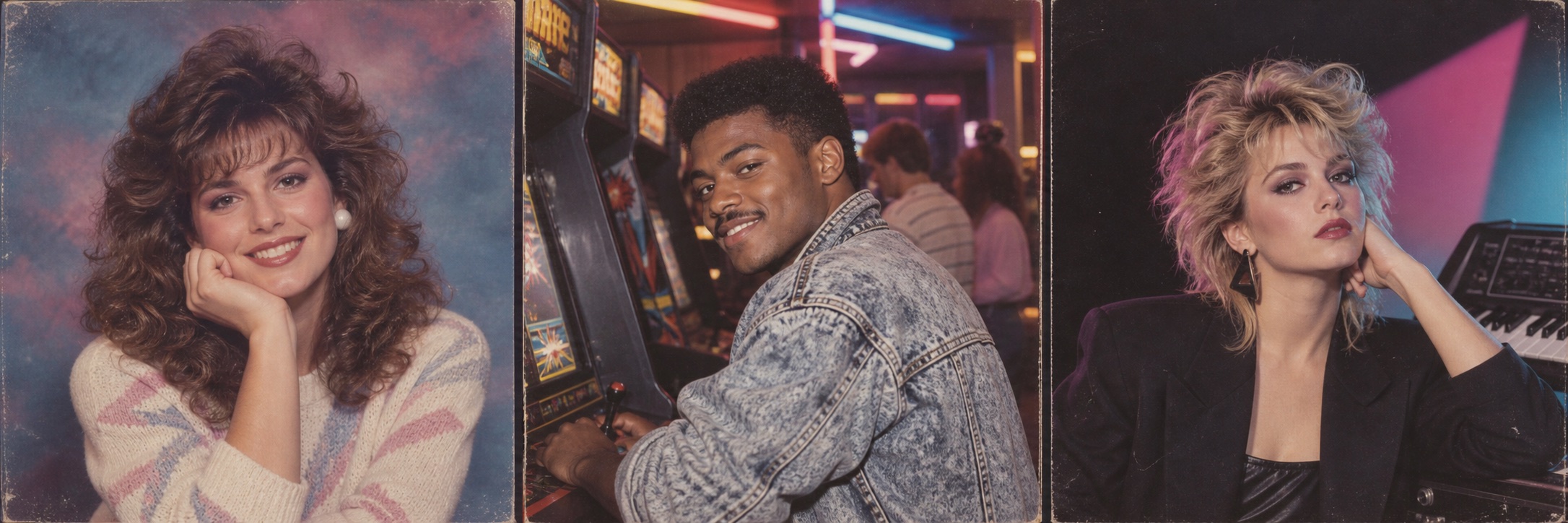
Three retro portrait directions worth trying
The classic studio portrait uses a painted gradient backdrop, diffused flash and careful posing. It is the clearest version of the trend and works well when the face should remain central.
The candid arcade snapshot trades polish for energy. Ask for direct flash, slight motion blur, practical neon, denim and the mild exposure mistakes of a consumer camera. The result should feel found, not designed.
The synth-pop editorial is sharper and more graphic: a dark studio, geometric light, a confident pose and restrained magenta or cyan accents. Keep the film texture and period styling, but avoid turning it into modern cyberpunk.
These variations also fit the wider photography mood of 2026. Grain, blur, light leaks and washed color are being used as a warmer, more human counterpoint to images that feel excessively perfect. The 80s trend gives that appetite for imperfection a recognizable decade and a personal face.
Before you share your retro AI portrait
Look at the image as carefully as you would any edited portrait. Check the eyes, teeth, hands, jewelry, clothing patterns and background objects. AI-generated details can drift, and a nostalgic image is still a creative interpretation — not a historical record.
Only upload a portrait you have the right to use. If another person appears in it, ask for their permission before editing or sharing their likeness.
The goal is not to reproduce every 1980s cliché at once. Choose one believable photo type, add the details a real camera would have captured, and keep the person at the center of the transformation.